Using Synternet Bridge
Preparing to Use the Bridge
- Visit https://staking.synternet.com/bridge/
- Connect your Ethereum wallet
- Connect your Cosmos wallet
If you click the wallet on the top right and select Manage Connections, both your wallets should show up as green:
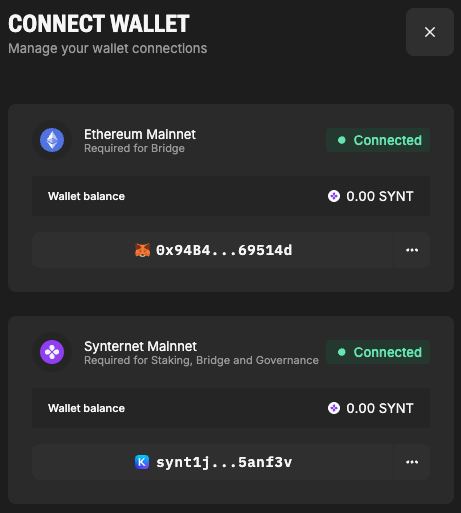
Make sure the wallet addresses that are connected are those that you wanted, especially if you operate with multiple addresses. Switching from one address to another can be done via corresponding wallet extension. The actual steps you need to take are intuitive but are slightly different in Metamask and Keplr, though.
Minimum amount of tokens that can be sent via bridge is 500 SYNT. The floor is imposed to prevent spam and protect users for paying more in gas costs than the value of tokens they are bridging.
Regarding the hardware device support on Keplr, Ledger is supported by Keplr wallet, but Trezor is not.
Bridging from Ethereum
- Choose the source and destination blockchain with a switch button: in this case Ethereum has to be on top, Synternet - on the bottom:
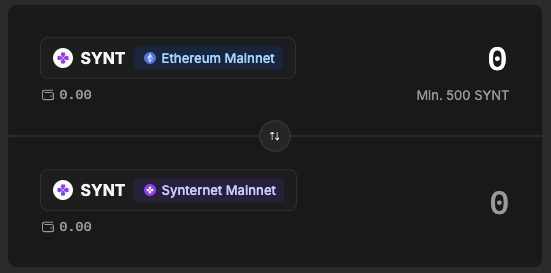
- Enter the token amount you wish to bridge
- Click Bridge and follow the on-screen instructions to sign the transactions with Metamask. There will be two: standard Ethereum approval and request for tokens to be bridged. Whole process will take a couple of minutes.
- Once the bridging process is complete, you will find the voucher for your tokens in the Claimable Tokens section.
- Click Claim to claim your tokens and sign the transaction with Keplr. The tokens will end up in your wallet almost instantly.
Learn More
📄️ Understanding Synternet Bridge
📄️ Staking
Bridging from Synternet
- Choose the source and destination blockchain with a switch button: in this case Synternet has to be on top, Ethereum - on the bottom:
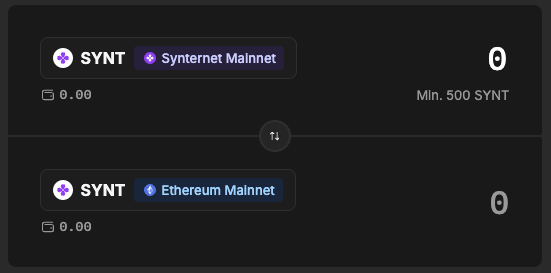
- Enter the token amount you wish to bridge.
- Click Bridge and follow the on-screen instructions to sign the transaction with Keplr. There will be a single transaction.
- Find the voucher for your tokens in the Claimable Tokens section. The Claim button will show up almost instantly.
- Click Claim to claim your tokens and sign the transaction with Metamask. The process will take a couple of minutes.
Troubleshooting
If you encountered an issue or in doubt whether you are doing this right, please, consult the FAQ section first and only then contact community managers on Discord or Telegram.