Synternet API (BETA)
The Synternet API provides programmatic access to our AI models, including the flagship Syntoshi Apex Thinking model. This guide will help you get started with making API requests.
Getting Your API Key
To access the Synternet API, you'll need an API key:
- Navigate to ai.synternet.com
- Click on your user profile icon in the bottom left
- Select Settings
- Navigate to the API Access section
- Copy your API key
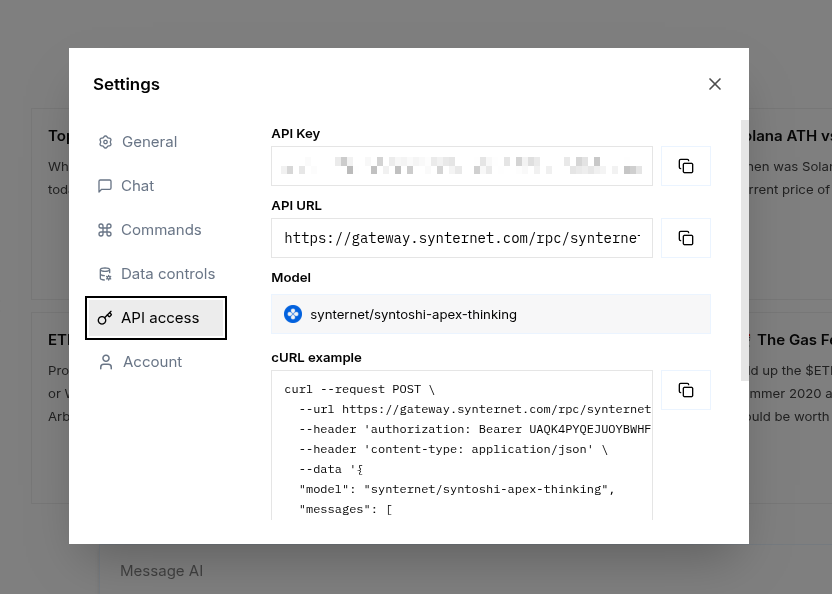
Keep your API key secure and never commit it to version control. Use environment variables or secure secret management systems in production.
Quick Start
Here's a basic example to get you started:
curl --request POST \
  --url https://gateway.synternet.com/rpc/synternet.ai.mainnet.v1./api/v1/chat/completions \
  --header 'authorization: Bearer YOUR_API_KEY' \
  --header 'content-type: application/json' \
  --data '{
  "stream": true,
  "model": "synternet/syntoshi-apex-thinking",
  "messages": [
    {
      "role": "user",
      "content": "Explain how blockchain consensus works"
    }
  ]
}'
Endpoint Details
Base URL: https://gateway.synternet.com/rpc/synternet.ai.mainnet.v1./api/v1
Endpoint: /chat/completions
Method: POST
Headers:
authorization: Bearer YOUR_API_KEYcontent-type: application/json
Request Parameters
| Parameter | Type | Required | Description |
|---|---|---|---|
model | string | Yes | Model identifier (e.g., synternet/syntoshi-apex-thinking) |
messages | array | Yes | Array of message objects with role and content |
stream | boolean | Yes | Enable streaming responses (see below) |
Available Models
synternet/syntoshi-apex-thinking- Our flagship reasoning model with advanced thinking capabilities- Additional models including direct partner integrations are available
Streaming Responses (Recommended)
Always set "stream": true for the best experience. Streaming provides real-time access to the model's reasoning process and final response.
How Streaming Works
When you enable streaming with "stream": true, the API returns responses in Server-Sent Events (SSE) format. You'll receive multiple JSON objects in sequence:
- Reasoning Objects - Initial objects containing the model's thinking process and reasoning steps
- Final Response Object - The last object contains the actual answer to your query
Example Streaming Response
data: {"id":"chatcmpl-123","object":"chat.completion.chunk","created":1234567890,"model":"synternet/syntoshi-apex-thinking","choices":[{"index":0,"delta":{"role":"assistant","content":"[Thinking: Let me break down blockchain consensus...]"},"finish_reason":null}]}

data: {"id":"chatcmpl-123","object":"chat.completion.chunk","created":1234567890,"model":"synternet/syntoshi-apex-thinking","choices":[{"index":0,"delta":{"content":"[Reasoning: Byzantine Fault Tolerance is key...]"},"finish_reason":null}]}

data: {"id":"chatcmpl-123","object":"chat.completion.chunk","created":1234567890,"model":"synternet/syntoshi-apex-thinking","choices":[{"index":0,"delta":{"content":"Blockchain consensus is a mechanism..."},"finish_reason":"stop"}]}

data: [DONE]
Each line starts with data: followed by a JSON object. The stream ends with data: [DONE].
Code Examples
Python
import requests
import json

url = "https://gateway.synternet.com/rpc/synternet.ai.mainnet.v1./api/v1/chat/completions"
headers = {
    "authorization": "Bearer YOUR_API_KEY",
    "content-type": "application/json"
}
payload = {
    "stream": True,
    "model": "synternet/syntoshi-apex-thinking",
    "messages": [
        {
            "role": "user",
            "content": "What is the future of decentralized AI?"
        }
    ]
}

response = requests.post(url, headers=headers, json=payload, stream=True)

for line in response.iter_lines():
    if line:
        decoded_line = line.decode('utf-8')
        if decoded_line.startswith('data: '):
            data = decoded_line[6:]  # Remove 'data: ' prefix
            if data != '[DONE]':
                chunk = json.loads(data)
                print(chunk)
JavaScript (Node.js)
const response = await fetch(
  'https://gateway.synternet.com/rpc/synternet.ai.mainnet.v1./api/v1/chat/completions',
  {
    method: 'POST',
    headers: {
      'authorization': 'Bearer YOUR_API_KEY',
      'content-type': 'application/json',
    },
    body: JSON.stringify({
      stream: true,
      model: 'synternet/syntoshi-apex-thinking',
      messages: [
        {
          role: 'user',
          content: 'Explain zero-knowledge proofs simply',
        },
      ],
    }),
  }
);

const reader = response.body.getReader();
const decoder = new TextDecoder();

while (true) {
  const { done, value } = await reader.read();
  if (done) break;

  const chunk = decoder.decode(value);
  const lines = chunk.split('\n');

  for (const line of lines) {
    if (line.startsWith('data: ')) {
      const data = line.slice(6);
      if (data !== '[DONE]') {
        const parsed = JSON.parse(data);
        console.log(parsed);
      }
    }
  }
}
Message Format
The messages array follows the OpenAI chat format:
{
  "messages": [
    {
      "role": "system",
      "content": "You are a helpful blockchain expert."
    },
    {
      "role": "user",
      "content": "Explain smart contracts"
    },
    {
      "role": "assistant",
      "content": "Smart contracts are self-executing programs..."
    },
    {
      "role": "user",
      "content": "How do they differ from traditional contracts?"
    }
  ]
}
Roles:
system- Sets the behavior/context for the assistantuser- Messages from the userassistant- Previous responses from the model (for multi-turn conversations)
Rate Limits & Quotas
BETA API access is currently subject to rate limits. For production use cases or higher limits, please contact our team.
Error Handling
The API returns standard HTTP status codes:
200- Success400- Bad Request (invalid parameters)401- Unauthorized (invalid API key)429- Too Many Requests (rate limit exceeded)500- Server Error
Example error response:
{
  "error": {
    "message": "Invalid API key provided",
    "type": "invalid_request_error",
    "code": "invalid_api_key"
  }
}
Best Practices
- Always use streaming (
"stream": true) - Provides better UX and access to reasoning - Implement exponential backoff - For handling rate limits and transient errors
- Secure your API key - Use environment variables, never hardcode keys
- Monitor token usage - Keep track of your API consumption
- Parse reasoning objects - The thinking process can provide valuable insights
OpenAI Compatibility
The Synternet API follows OpenAI's chat completions API format, making it easy to integrate with existing tools and libraries that support OpenAI-compatible endpoints.
Support
For API issues, feature requests, or questions:
- Join our Discord community
- Visit our GitHub